Showing posts with label Teaching and Learning. Show all posts

Saturday, January 5, 2013

Destiny

I had the great opportunity to present the closing keynote for the 2012 Fall TECSIG meeting this year.  I chose to speak about Destiny, and tell a little bit about the life experiences of my and my son Robert.  My goal was to tie those experiences back to some current issues I see in Education.  I didn't feel like I did as great a job as I could have in that manner.  But you can be the judge of that.  :)  Tim Holt (@timholt2007) captured it all on film:
http://youtu.be/qjunYlea1aQ

Check it out.  At the very least you will learn a little bit more about me.  And you might just find out if Russia is really visible from a front porch in Alaska. :)

Monday, July 16, 2012

Is keyboarding a dying art?


http://www.flickr.com/photos/22443621@N00/151077464/

How much time do your students spend practicing keyboarding in your school?  The students in our district begin learning keyboarding in kindergarten.  In the past they have spent a significant amount of time in their computer literacy courses learning how to type.

Over the past year our district has been developing a plan to completely change how our elementary lab courses work.  We want to move to a more project based curriculum framework, and we want to focus less on specific tools, and more on skills.  Our plan is to create a new project based curriculum that will pull content from the core subject areas for projects.  In these projects we will target technology skills like word processing, data analysis and research, animation, filming, and photography.  This way our students are gaining technology skills while also reviewing content from their core subjects.

Once we discussed what we wanted our students to do, we then needed to tackle the device we wanted to use.  We decided to go with iPads.  However, we were concerned that our students wouldn't learn to type as well if they only learning on the virtual keyboard.  So we plan to buy full size bluetooth keyboards that will be used specifically during keyboarding practice.

My question is:  How important will keyboarding be in the next five years?  As voice dictation capabilities improve will there be a need to type?  As I was brain storming this idea I used the voice dictation features of Evernote to save some of my thoughts.  Based on this experience, I won't be dropping my keyboard anytime soon.  But five years is a long time.  Will next years kindergartner still need to rely on keyboarding skills when they move on from elementary school in 5 years?

If we didn't spend time dedicated to keyboarding we could dedicate more time to teaching critical thinking, data analysis and research skills.  Would time be better spent on these skills over that five year period?  Or will keyboarding still be critical?  In my opinion keyboarding may just be a dying art.

Monday, July 2, 2012

Innovating around mono vision - The School CIO Summit

I was lucky enough to be invited to the Tech and Learning SchoolCIO Summit in La Jolla, CA on June 22-23.  I have to give a shout out to my boy Carl Hooker for helping me get the invite (he is a pretty big deal around here in case you didn't know - http://youtu.be/HRJ6I0X0BKg).  This was one of the most enjoyable events I have attended in recent years.  The attendees were made up of CTOs, CIOs, Technology Directors, Superintendents, and even a few Curriculum Directors from across the nation.  Texas, and Illinois spawned the largest groups of attendees, and yes it did turn into somewhat of a competition.

Our first stop was at the Calit2 facility on the UC San Diego campus.  This research team is studying innovative commodity technology.  These are technologies that will eventually be brought to the masses, but are still in development/testing.  The first demo we saw was video in 4K vs. DVD quality.  The difference was amazing!  4K is basically 4 times the quality of 1080p HD.  Wrap your head around that!  4K is for kids you say?  Good news, they are working on an 8K standard too!  They showed us recording of a  vocal performance that was recorded live in 4K.  The definition was amazing.  It looked (and sounded - but that is a different standard) as if you were actually sitting there at the performance.  One of the attendees suggested that if there was a way to produce the sound as if it were coming from the location of the performers mouth that would make it just as good as being there live.  This vocal performance was being streamed from disc, and it required an 800mb+ stream to send the data.  Talk about truly needing a gigabyte connection!

If you want to get started on filming in 4K, you are in luck.  If you can afford it, you can pick up one of these cameras from Red.  These are the cameras that were used to film the Hobbit, and Prometheus.

Next we got to see live demos of their 3D virtual cave, which uses a combination of angled screens/projectors all connected together with a software package that allows you to explore in a world in 3D.  Now, I have to add here:  For those of us in the world that can only see in 'mono' vision, this isn't all that exciting.  You need to be able to see in stereo (using both eyes).  However, as it was bluntly pointed out, only about 10% of the population can't see in stereo (as you can tell, I'm not bitter at all).  The education aspect of this was thinking about how your students could explore a location that they can't physically get to.  Such as the great pyramids, or an archaeological dig site. You could also use an augmented reality browser (like Argon for example) to markup the physical world.  One attendee wanted to know how using hologram technology would fit into this realm.  He cited hologram Tupac as an example.  He was met with very confused looks.  And the rest of us Texans just had to sigh...

The other aspect of this demo was a room with LCD panels all connected in series.   We were shown a gigapixel image of a mountain.  What was amazing was the ability to zoom in on specific areas of the image (even a child playing soccer) without losing resolution or clarity.  They also showed us a picture from a microscope of actual brain fibers.  The discussion around this topic was pretty amazing.  Having a screen this size, with this resolution allows for the collaboration of video/image analysis.  Imagine being able to stand with a group of peers in front of an image on a wall, instead of huddling together around a laptop screen.  Then take it a step further, add in the ability to interface directly on the screen with tactile input in order to manipulate and adjust the video/image.  This would be an amazing collaboration experience for students.  While the Calit2 team didn't have the tactile input features available, they were working on it.  They actually had the cameras setup to begin testing a feature similar to the Xbox Kinect.

I also decided that I wanted to order a set of these contact lens!  WiFi enabled with a 16 megapixel camera!  That is what I'm talking about it!

The following day we came back together to listen to our keynote speaker Jaime Casap from Google.  We spent the day discussing four key areas in break out groups, and addressed concepts that Jaime had us think about.  Some of the key questions that came out of those discussion were:

  1. Can we create a 1:1 for the user experience rather than for the device?
  2. Why is collaboration cheating?
  3. How do we better use technology to create individualized learning?
However, the biggest 'aha' came after the break out groups presented and we were discussing the presentations.  We started talking about 21st Century Learning, and the four Cs (Critical Thinking, Collaboration, Communication, and Creativity).  Someone mentioned that it was time to stop talking about the 21st Century aspect (something that has been driving me nuts for the last few years).  And finally a solution to this problem was suggested!  Henry Thiele from Illinois proposed that we just drop the 21st Century part and call it Learning!  Bravo Henry!  I love it!  He wrote a great blog post about his suggestion here.

This event was amazing, and very thought provoking!  I want to say thanks to Tech and Learning for inviting me.  I have also created a Twitter list of all of the amazing leaders that I met at this event.

Related Links:

Wednesday, April 4, 2012

Students as teachers #edchat


While subbing in a 4th grade classroom I setup my iPad and my MacBook in two different areas of the room.  I quietly pulled two kids and gave them each about 15 seconds worth of instruction on Photobooth.  Basically, I said it lets you take silly pictures and here is the button that takes the picture.  I told them to experiment with it, and take a few pictures of themselves.  After a few minutes I came by and told them that I was going to send a new student over to each of them, and they had 2 minutes to teach the new student how the app worked.  I rotated all the students through, with each of them teaching the next.  The students loved it!  And as more of them rotated through, their knowledge grew.  When they figured out something new they were so excited to teach it to the next student.  At the end of the day we took about 10 minutes and looked at all the pictures.  It was so exciting to see how their skill set expanded. Right before we left class that day I took a minute and I explained to them what they had done.  I told them that while they had been learners that day they also had become teachers.  I let that thought sink in for a seconds and then I told them again as I watched their faces.  As they processed you could start to see the pride swell up in them.


My goal was to inspire them and to motivate them not only to learn, but to understand that they can be teachers too.  Learning doesn't just go one direction anymore.  It has to go in all directions.  We are all learning from each other.


Students should get the opportunity to be teachers every day!

Wednesday, March 28, 2012

Break the learning limits!

http://www.flickr.com/photos/frants/1464952138/sizes/l/in/photostream/
Recently, I was trying to purchase a belt and socks that would work for my son's t-ball uniform.  He is playing t-ball for the first time and is on the Red Sox team for his age group.  Now, I don't claim to know anything about baseball.  I've never really played baseball, and it is probably one of my least favorite sports to watch (unless I actually get to go to the stadium).  However, I want my son to try every sport he is interested in, and I plan to help encourage him wherever possible.  I don't want my knowledge of the sport to limit him from learning/enjoying it.

As I stood there with a light blue belt and a dark blue belt in my hand, I struggled to remember which color of blue are in the Red Sox uniforms.  I tried to Google it, but I couldn't get any great images on my phone that really told me for sure.  I decided to post a picture of both belts to twitter and see if my PLN could help me.  I quickly got a number of replies, and was told that the dark blue belt was the one to go with.

What as great about this, is that my limited knowledge of baseball did not limit my son's education/experience in baseball.  Even though I didn't know the correct colors, I was able to figure them out, and make sure he didn't end up looking like he was on Spiderman's team instead of the Boston Red Sox.

http://www.flickr.com/photos/stuckincustoms/6306983152/sizes/l/in/photostream/
I think this draws an important parallel with education.  Just because I don't know the answer to a question, doesn't mean that should limit a student's education.  We now have the power of PLNs to rely on.  We all have Google in our pocket.  We can always find the answer!

There is no longer an excuse for education to be limited by an individual's knowledge!


Friday, March 23, 2012

Love the kids! #edtech #edchat

At the closing keynote for TCEA2012 Stacy Bess told an emotional story about loss, and love.  It pulled on our heart strings, yet at the same time it was inspiring.  I saw more than one person fighting back tears and for me this capped off an amazing and inspiring convention.

http://www.flickr.com/photos/34726560@N00/2630535974/
My favorite quote from Stacy Bess was: "Don't hide behind your credentials. Get down on the floor and be a human being."  I thought that was a great quote, and it really inspired me.  I think some times we do get caught up in what our title is.  Or maybe we just get caught up in all of the little things that we have to get done each and every day.  Either way I think we sometimes forget what our job really is.  Our job is to love children.  To care about them, motivate them, inspire them, and teach them.  In this day and age, there are so many things that can distract us from that job.  I wish we could get rid of some of our labels: GT, LEP, SpEd, ELL, etc.  Because I believe that some times those labels can also serve to prevent us from seeing the kids.  We must focus on the kids, and remember that they are kids, not labels.  The kids needs us.  They need us to see them, to know them.  They need us to understand them, and to motivate them.  They need us to inspire them.  And above all else, they need us to love them.  It might be the only love they get that day.


I had the pleasure of subbing in a 4th grade classroom a few weeks ago.  My goal was to live that quote from Stacy Bess.  I didn't want to hide behind my title.  I didn't want to just get through the day, and worry about all of my tech director duties.  I wanted to get down on the floor and connect with those kids.  One of the first things we did that day was a timed math quiz on multiplication tables.  One little girl told me "I don't want to take this test because I'm not good at math."  Before I started the timer I got down on my knees in front of her desk.  I told her she was amazing at math.  I told her she could do it.  I told her "I can't believe you don't know was 6 x 0 is!  Or what 6 x 1 is."  She said, "Well, of course I know those ones."  I quickly showed her how many times those appeared on the test and then urged her to do her best.  I started the timer and she got right to work.  When I collected her test, I gave her a high five.  I told her she did an amazing job!  The smile on her face told me that maybe, just maybe, she didn't think she was as bad at math as she did before the quiz.  For the rest of that day, I tried my best to inspire her and her classmates.  We ended up having a lot of fun learning together!  And I can't wait to go back!


Don't forget to the love the kids!

Tuesday, February 7, 2012

What Content Are You Filtering? #TCEA2012

Here are the resources for my presentation today at TCEA2012.
I am presenting on Content Filtering and what the requirements of CIPA are.  Hopefully we will have a great discussion about what we are required to filter, and why we might think about the positive aspects of opening up certain types of content.  We will also discuss the need for teaching our students responsible use.  The shared notes is an editable google document that you can use to take live notes (and even ask questions) during the presentation.

Prezi

Shared Notes (Google Doc)

Poll

Let me know what you think!

Wednesday, December 14, 2011

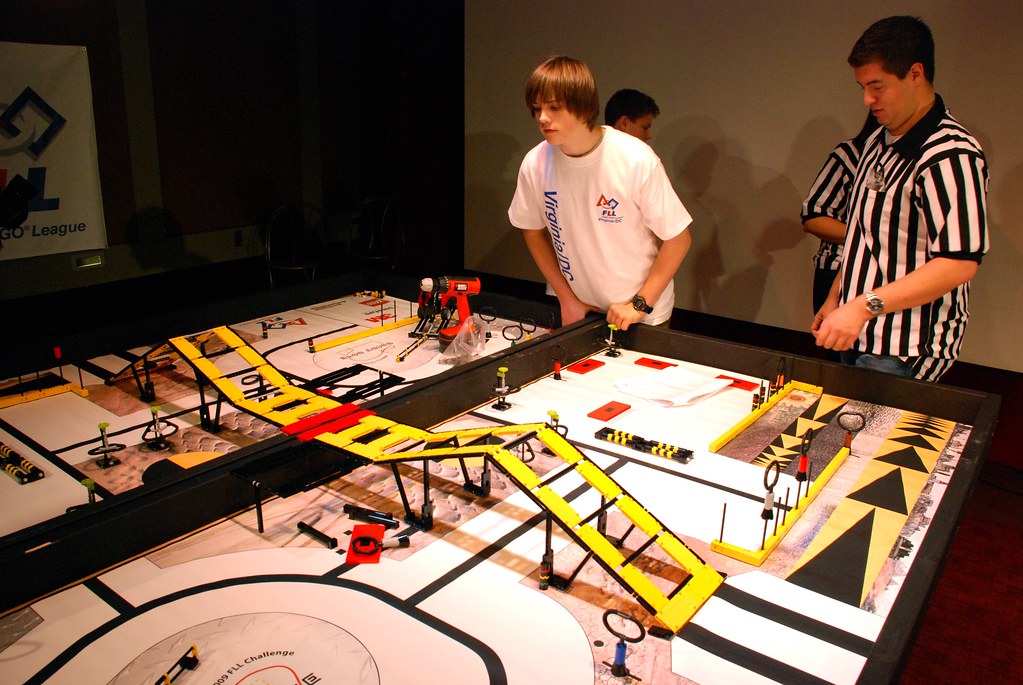
How are you supporting robotics?

http://www.flickr.com/photos/7791881@N04/4115004912/
We have had a robotics program in our district for many years and I have always wanted to be more involved in building this program.  I have finally gotten that chance over the last year.  And I am continuously amazed by the things our students do in robotics.  

This past weekend we took our high school clubs to our regional TCEA robotics competition.  I have been working with one of the clubs for the last few weeks trying to help them prepare for this competition.  After making connections with these students it was that much more fun to see them in their first competition.

What I saw were students engaged in problem solving, critical thinking, collaboration, and communication.  Only they didn't really know they were engaged in any of that.  Mostly because they were having so much fun with their robots!  Having fun when you learn makes such a difference!

My favorite pieces of the competition:

  1. In the arena competition they have to compete in multiple rounds.  In between those rounds they get about 30 minutes to adjust their bot (either through physical or program modifications).  They must work together to identify the needed adjustments, and the divide and conquer to enact those adjustments.  And they must do it quickly in order to test the outcome and make sure they haven't broken anything that was already working.
  2. In the invention competition, they are not only judged on the invention itself, but also on how they present and 'sell' their idea.  They have to create marketing materials, and give an oral presentation.  They also have to show their robot in action.  This is practice that our students desperately need if they are ever going to successfully sell and idea, or a project in the future.
These are skills that aren't measured on standardized tests.  They aren't reflected in accountability ratings.  Yet, they are (in my mind) absolutely critical to our student's success in their future endeavors.  I can't think of many better experiences for our students to have.  And on top of that they are getting a great STEM foundation.  I am very proud the successes we have had (two of our teams even qualified for the state TCEA competition!).  But more than that I am excited about the direction our program is headed. 

So my question to you is:  How are you supporting robotics?  :)

Thursday, November 3, 2011

Storytelling - Dean Shareski

I had the pleasure of learning from Dean Shareski (@shareski) today at West Lake High School. He was discussing storytelling and how we have so many ways to tell a story these days. Below is the prezi he was working from:

Sunday, July 31, 2011

Special Interest Groups (SIGs) in your district? #edtech

Has anyone successfully created special interest groups (SIGs) for the teachers in their district? This is a project I want to try this year, but I am wondering if anyone else has tried it already. And if so, how did it turn out?

I would like to create different SIGs for specific technology topics. Like say an iPad SIG, or a collaboration SIG. The SIG could meet monthly, or every couple of months. Not so often that people get burned out, but enough that people can get regular information on the topics.

I want to run the meetings in an 'un-conference' style. Where we can run short concurrent breakout sessions which are driven by the requests of the crowd. I think we could start out with our technology specialists running the breakout sessions, but my hope would be to eventually have the teachers (and possibly students and community members) take over the presenting.

Is anyone already doing something like this? How would you feel about participating in district PD run this way?

Wednesday, July 27, 2011

Allotment gone for Texas Virtual School Network (TxVSN)

New legislation from the 82nd Texas Legislature, First Called Session, 2011 introduced changes to funding for students taking online courses through the Texas Virtual School Network (TxVSN). A student enrolled in a course offered through the TxVSN enables the district to earn funding under Texas Education Code Chapter 42 in the same manner as a student who is enrolled in a traditional classroom setting. Separate TxVSN allotment funding is no longer available to Receiver or Provider Districts.


TxVSN will continue to offer quality online high school and dual credit courses for Texas students; however districts and open enrollment charter schools will be responsible for the course cost beginning with fall 2011. Schools may use a variety of sources of funds, such as Foundation School Program (FSP) funds, the Instructional Materials Allotment (IMA), applicable state and federal program and grant funds, or local funds.


For additional information, visit www.txvsn.org.

SBOE Approves Standards for Technology Applications

Because of the changing nature of computer technology and the digital environment, the State Board of Education gave final approval to the Texas Essential Knowledge and Skills for Technology Applications for kindergarten through eighth grade, as well as to 19 high school courses.

The revised curriculum standards will be implemented in 2012-2013. These replace standards in use in Texas classrooms since 1998.

Some of the courses for which curriculum standards were approved are Robotics Programming and Design, Game Programming and Design, Mobile Application Development, and Digital Design and Media Production. AP Computer Science A, IB Computer Science-Standard Level, and IB Computer Science-Higher Level were all included in the new Subchapter D, which was approved by the SBOE in April 2011.

At the board’s July meeting, standards for six high school courses were approved. Those courses are Fundamentals of Computer Science; Computer Science I, II, and III; Discrete Mathematics; and Web Game Development.

All the Technology Applications courses are organized around six strands: creativity and innovation; communications and collaboration; research and information fluency; critical thinking, problem solving, and decision making; digital citizenship; and technology operations and concepts.

More information about the curriculum standards update is available at http://www.tea.state.tx.us/index2.aspx?id=8192

Monday, July 25, 2011

Merit Pay: What should it be based on? #education

Merit pay is a constant thought that is always bouncing around in my head. Sometimes I think it could be the key to education reform, and sometimes I think it could very well destroy the education system. With all the news coming out of Atlanta with their cheating scandal, it seems to look like the bad guy right now. However, I have always believed that merit pay, when tied to test scores would ultimately lead to cheating. Why then are we still talking about tieing pay directly to test scores? Because the question remains: What else do we tie it to? I have thought about this for years, and I have never come up with a good answer.

However, today I had an idea. I haven't decided if it is a good idea, but it is an idea none the less. I am wondering if it would be possible to tie merit pay to student projects. We want our students to create. We want them to learn 21st Century skills and become responsible digital citizens. We also know that by participating in exciting projects our students will be more engaged. And we know that anytime there is a story involved (which a project can become) it is easier for our brains to recall information. All this leads to the fact that quality projects are good for students.

So what if we create a way to measure the quality (not quantity - we don't want to just give out rewards for volume) of student projects that are produced throughout the year. Is that even possible? Does anyone do that now? Educators could create a portfolio of the work that their students produce, and submit that for review at the end of each year. We could build a review process that encourages improvement through the creation of student projects, and rewards those that are succeeding in that area.

In theory this style of learning should lead to improvement in student performance. But would it? What are your thoughts?

Tuesday, June 28, 2011

What IT departments can learn from Braveheart #edtech #iste11

I have to admit I am a fan of the movie Braveheart. If you have seen it you know there are quite a few notable quotes in the movie. One of the quotes that has always stuck with is this one:
"There's a difference between us. You think the people of this land exist to provide you with position. I think your position exists to provide those people with freedom. And I go to make sure they have it." - William Wallace to Robert the Bruce
The more I think about this quote I think it can apply perfectly to an IT department. While not always the case today, all to often IT departments have the idea that they need to lock down their network, and serve as the police of the network. I know. I have been there. And I am ashamed to say I have put processes in place to lock things down. However, I have seen the light. And I am working hard to get us out of the police business. If you take out the word 'land' in the above quote an replace it with network, it really hits home.
"There's a difference between us. You think the people of this network exist to provide you with position. I think your position exists to provide those people with freedom. And I go to make sure they have it."
The network doesn't exist to provide the IT department with jobs. It also doesn't exist so that we can limit its use. The network is there to support creativity and innovation, to allow collaboration and communication, and to facilitate data analysis and problem solving. The network is there to provide freedom. And our IT departments are there to make sure we have it!

Saturday, June 25, 2011

What are the key factors that make PD successful? #edtech

How would you have answered the above question?

I came up with four key factors that need to be addressed.

1)Awareness
Teachers/Administrators have to be aware of what tools are available. If they aren't aware of the tools it is hard to get them into PD. Everyone is so busy if there isn't a hook then there isn't a reason to give up time. If they have a basic idea of what their kids can do with a specific tool, then they will make more of an effort. We have to find ways to create more awareness of what is available.
Here is how we are trying to address this: We have built a better social media presence. We want to use marketing to our advantage and take the information to the masses. There are so many different networks and everyone has their own favorite. We want to get our message out there in whatever medium they are using. We are using a blog to post daily tech tips, as well as advertise services. Our blog posts feed into our Twitter and Facebook accounts. We also use YouTube to post video announcements, screencasts, and workshop recordings.

2)Time
Have you ever heard how teacher's can eat faster than anyone else? This is because they have such crazy schedules during the day, they hardly have time to eat lunch! And at the end of the day they want to get home to their families just like everyone else. So the question is: When do they have time for PD. You can pull them during the day and cover their class with a sub. But there are already so few days of instruction in our age of high stakes testing.
Here is how we are trying to address this: We are trying to offer PD through multiple mediums. We are still doing face-to-face workshops, but we are trying to offer more workshops at different locations to make it easier for different groups to attend. We are recording as many sessions as possible and making them available via YouTube. We are using some of those recordings to help build online courses through Moodle. And we are just now working to allow virtual attendance to workshops/meetings through Big Blue Button.

3)Relevance
Just like our students want to know why it is important for them to learn a topic (ie. Geometry), so too do our teachers. We have to take time to show them how a tool can benefit them in their classroom. And what their students can create with it. I think in technology we often get tied up in the stuff (the devices, the tools, etc.) rather than the skills. We tend to create workshops on specific devices rather than what these devices allow a student to learn/achieve. We tell our teachers that they shouldn't be teaching the technology, they should be teaching with the technology. But I fear too often we don't follow our own instructions. Some of us really need to actually see a lesson that has the tool built in. Or at least see an example of what students can do with it. We also need to show how the standards are tied together, and how the technology supports the other standards.
Here is how we are trying to address this: We are trying to do a better job of breaking down the Technology Applications TEKS and making everyone more aware of how the tie into everything else. We are trying to make our PD about skills rather than stuff. Instead of teaching a session on how to use Google Docs, we are teaching a session on collaboration where Google Docs is just one of tools covered. By focusing on the skills I think we also pull in a bigger audience. Someone might not know what Google Docs is, but they may know they want to get better at collaborating. We are also trying to work more closely with our curriculum counterparts in order to present more of a unified front where everything is aligned and supported in example lessons. Here a link to our summer PD advertisement.

4)Support
We need to properly support our teachers/administrators after we train them. With all of the budget cuts across the nation this will become harder and harder. So we must innovate, and find a way to still provide support. Part of support is also building the right type of environment for them to work in. It is often noted that kids aren't afraid to break technology and that is one of the reasons why they are so comfortable with it. They are willing to try it and if they fail, they try it differently the next time. They aren't worried about breaking it. Many adults are worried they will break it. And they don't want to fail. So we must build a supportive environment where it is ok for them to fail. Another aspect of support, is the support that students can provide. Students are our best resource! We shouldn't be afraid to let them help us!
Here is how we are trying to address this: We are working to build a team of teachers at each campus that will be part of a support team. This team won't be focused as much on tools, as it will on skills. But they will be the primary support team for the campus. They won't receive a stipend or any rewards other than recognition for being a leader. We want them to be passionate about what we are doing. We believe passionate people will make our message contagious. By having a group instead of a single contact (as we have had in the past) we hope to give teachers multiple options to find someone when they need help. In our professional development sessions this summer we hope to encourage failure! Yes, we want people to fail. We want them to understand that it is ok to fail with us. And that we will be there to help them out and give them some options to try the next time. We are also working to bring in students to help present in each of our workshops. We want our teachers to see that our amazing students can teach us too!

These are the key factors that I see affecting PD. I am sure I have missed many others.

What are your thoughts?

Tuesday, February 8, 2011

Learning Spaces discussion - #lsebc11


Sitting in a discussion at Lonestar Edubloggercon listening to David Jakes (@djakes) and Ryan Bretag (@ryanbretag) talking about learning spaces.

Where does learning happen? It should happen in the whole building.
Build the space you want teachers to work in, then bring them to that space to train them. Let them experience learning themselves in that space. Model the space with them. Don't just try to create the space and expect them to change.

What does it mean to be well educated? And what type of space allows that to happen? These are the questions that we should be asking.

Turn non-learning spaces into non-traditional learning spaces. Google learning streets to get some more ideas.

Resources to look at:
Flickr search for learning commons
Google search for learning streets
thethirdteacher.com
Learning Spaces Educause e-Book

Monday, January 24, 2011

Apple Purist or....

Recently we had quite a discussion (argument is probably a better term) about Windows vs. Mac (and the hardware underneath) on our tecsig listserv. It started out a simple question of what to load on an Apple in terms of an office productivity suite (among a few other things). As I read the initial question I saw a few similarities in some of our district's recent experiences. Our district had gone through some similar discussions last year when we decided to move from a nearly complete Windows 'shop' to recommending MacBooks and iPads as the student devices in our new high school. I decided to reply to the question and to lay out some of the rationale behind the decisions that we made, and how we ended up feeling comfortable with this move. Initially, I only had the writer of the question listed in my response, but ultimately I decided to include the listserv thinking that others might be interested as well. I ended up opening quite a can of worms, which I wasn't really expecting.

My intention was to just lay out our experiences, and conversations, which helped lead us to our decisions. I was not recommending that anyone follow in our foot steps, or that our way is the only way. I was simply just hoping to share what we went through. Some how the fact that I recommended Apple devices turned into me being an Apple Purist. Huh? Seriously?

Ultimately, this 'conversation' reinforced my belief that we must continue to build more open systems. We must continue to become more platform agnostic. We must do this for our students. If we don't, we risk allowing them to venture out into the world with a closed mind towards new and different systems. Aren't we failing them by not allowing them to find the system that makes them the most efficient? Aren't we failing them if we only provide them with one option? Isn't it our purpose to teach them? To empower them to become life long learners? Aren't we supposed to be creating individualized instruction? How does only offering access to one type of system help facilitate that? By offering access to multiple systems we allow the learning to determine the technology. The learning is the focus! The technology should be transparent.

The focus should always be what is best for all of our students, and what will best prepare them to be successful in our global economy. That is what I hope to stay focused on. I have no intention of becoming an 'Apple Purist' or creating a 'shop' of any one specific brand. I hope to further embrace a more open system that facilitates creativity, exploration, and spontaneous learning.

Sunday, December 12, 2010

Using quicktime to create screencasts

Screencasts can be such a great way to provide training. You can't beat showing a user what their screen should actually look like.

I was recently shown that you can easily create screencasts using Quicktime. You can do this in both OS X and Windows (in Windows you need the pro version of Quicktime though). In either environment you have the ability to easily record audio along with your screen which is quite handy.

To get started you go to the file menu and select 'new screen recording'. You can also use the built in webcam (on your mac) to create a video or just the microphone to create an audio recording.

I've been using this tool to create screencasts of my prezis that I can then sync up to the audio recording of an actual presentation.

It is so easy! And free (on the Apple side)!
Published with Blogger-droid v1.6.5

Tuesday, July 20, 2010

Digital Learning Farm - Alan November #ISTE10

I had the opportunity to attend one of Alan November's sessions at ISTE2010. The session was entitled: Digital Learning Farm (Students as contributors). This was my first opportunity to hear Alan November, and I thought he was a great presenter with a great message. My main take aways from his presentation were:
  1. Because the majority of students will ask their friends for help before they ask their teachers, their success is somewhat dependent on who their friends are.
  2. Giving grades over time puts creativity in decline, as students will begin to do only what is required to get an A.
  3. Assign students jobs in your classroom. Always have at least one official researcher for the day. He/She is in charge of finding the worlds best resources for the content that is being covered. This way at least one student is learning great research skills every day!
  4. The teacher's knowledge shouldn't be the limit for a student's learning.
This was a great presentation that has left me with much to think about. He also talked about doing purposeful work, and tied this into Daniel Pink's new book Drive. Since the presentation I have also found two great videos that you can watch to get some more information.

Alan November - Myths and Opportunities


Daniel Pink - Drive Animated


And finally, here are my notes from the presentation:

Tuesday, July 13, 2010

Reflection on Closing Keynote for #iste10


The closing keynote for ISTE2010 was Jeff Piontek. Jeff is the head of the Hawaii Technology Academy. I thought his keynote was far and away the best of the three ISTE keynotes. He knew his audience, and he knew his presentation even better.

I thought his most powerful idea was that of re-tooling the age old idea of S.T.E.M. (Science Technology Engineering and Math) in education. His recommendation is to change it to S.T.E.A.M. = Science Technology Engineering Arts and Math. Anyone who is familiar with Daniel Pink's 'A Whole New Mind' understands the need to reinforce the arts in our students' education. However, Jeff has come up with a handy way to remind ourselves of it by simply adding one letter to a term all educators are familiar with.

How creative are the students in your district/school/classroom? Are you building an environment that allows creativity to develop? Many of our schools stifle creativity in the elementary years. As our students get older, we begin to focus more and more on high stakes testing and teaching to those tests. Yet, in doing so we neglect some of the most important aspects of our students needs: creativity, critical thinking, and analytical skills. The closing keynote for the TCEA2010 conference this year was by Erik Wahl. His entire keynote was focused on the lack of creativity in schools today. Erik is an amazing artist, yet in elementary school he was told he was wasting his time drawing and so he put down his crayon. He didn't pick up another crayon until he was in his twenties. One comment from one teacher cost him upwards of twenty years worth of art. How many students have this happen every day?

We must encourage creativity! Not stifle it. We must embrace the arts and make sure we are teaching S.T.E.A.M. not just S.T.E.M. Make sure you keep a box of crayons handy. :)