Friday, June 28, 2013

#ISTE13 Six Word Story Project

As I'm reading through all the ISTE13 recaps, I started thinking about how it might be cool to create a six word story about my ISTE13 experience.  As I thought about what mine might entail, I wondered what others might look like.  And then it hit me.  We should make a collaborative video of six word stories all put together into an ISTE13 compilation!

So, here is the deal.  The more people we get to add to this, the more fun it will be.  Spread the word.  I first heard about the idea of a six word story from Dean Shareski (@shareski).  And I think it is a great project for any teacher to use in their classroom.  So, this will be good practice for you.  :)

Tell the story of your ISTE13 experience with one image and just six words.  It can be an image that you took at the conference, or one that someone else took that helps tell your story.  Look here for some ideas from Ben Grey's (@bengrey) wiki: http://bengrey.wikispaces.com/6+Word+Story+Project

Use a photo editor (pixlr is a good free one for Chrome and Fotolr used to be pretty good on the iPad) to add the text of the story to your image.  You can publish your image to a photo sharing site like Flickr and then add it to our Google Presentation by the URL.  Or you can upload a copy of the image directly to the Google Presentation.

Add your story to the collaborative Google Presentation here:
http://goo.gl/cVHUS
Be sure to include your name, where you are from and twitter/g+ account info in the notes section of your slide.

I will download the slideshow and create a video out of all of the stories.  And then in two weeks we will have a Google Hangout to watch the end result.  Sound good?  :)

Thursday, February 21, 2013

Thoughts on the Google Pixel

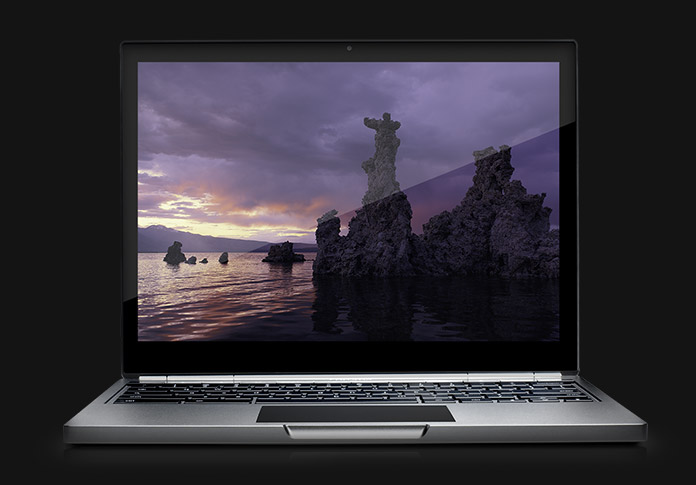
Google Pixel
As I read the news about the Google Pixel announcement it seemed that there was a lot of focus on the price of the device ($1299-1499).  I don't think evaluating this device on price is the right angle at all!

When I was first reading about it, the first thing I focused in on was the touch integration announcement.  ChromeOS just added touch integration! Seriously!  No, there isn't a full keyboard, but the touch integration is there with gestures.  This paves the way for a whole new set of devices running ChromeOS!  And with the Chromebook partners picking up speed, there is a lot of potential here.

Combine that thought with the physical specifications and design of the Pixel.  It is almost so impressive it is scary.  Apple's prized possession of late has been their screens.  First on the iPhone and iPad screens.  With the inclusion of the Retina display on the MacBooks this year they continued that trend.  However, Google just took Apple's lunch money and put them on notice with the Pixel display!

The Google Pixel has a 12.85" screen running at 2560 x1700.  It has a Intel i5 processor (1.8ghz), and 4GB of ram.  Throw in a ChromeOS with touch integration and you have a pretty major statement.  Google just proved they can package the same high quality hardware (designed with software in mind), with all the advantages of a web based ChromeOS.

Boom!

Imagine where we go from here...  :)

Saturday, January 5, 2013

Destiny

I had the great opportunity to present the closing keynote for the 2012 Fall TECSIG meeting this year.  I chose to speak about Destiny, and tell a little bit about the life experiences of my and my son Robert.  My goal was to tie those experiences back to some current issues I see in Education.  I didn't feel like I did as great a job as I could have in that manner.  But you can be the judge of that.  :)  Tim Holt (@timholt2007) captured it all on film:
http://youtu.be/qjunYlea1aQ

Check it out.  At the very least you will learn a little bit more about me.  And you might just find out if Russia is really visible from a front porch in Alaska. :)

Monday, July 16, 2012

Is keyboarding a dying art?


http://www.flickr.com/photos/22443621@N00/151077464/

How much time do your students spend practicing keyboarding in your school?  The students in our district begin learning keyboarding in kindergarten.  In the past they have spent a significant amount of time in their computer literacy courses learning how to type.

Over the past year our district has been developing a plan to completely change how our elementary lab courses work.  We want to move to a more project based curriculum framework, and we want to focus less on specific tools, and more on skills.  Our plan is to create a new project based curriculum that will pull content from the core subject areas for projects.  In these projects we will target technology skills like word processing, data analysis and research, animation, filming, and photography.  This way our students are gaining technology skills while also reviewing content from their core subjects.

Once we discussed what we wanted our students to do, we then needed to tackle the device we wanted to use.  We decided to go with iPads.  However, we were concerned that our students wouldn't learn to type as well if they only learning on the virtual keyboard.  So we plan to buy full size bluetooth keyboards that will be used specifically during keyboarding practice.

My question is:  How important will keyboarding be in the next five years?  As voice dictation capabilities improve will there be a need to type?  As I was brain storming this idea I used the voice dictation features of Evernote to save some of my thoughts.  Based on this experience, I won't be dropping my keyboard anytime soon.  But five years is a long time.  Will next years kindergartner still need to rely on keyboarding skills when they move on from elementary school in 5 years?

If we didn't spend time dedicated to keyboarding we could dedicate more time to teaching critical thinking, data analysis and research skills.  Would time be better spent on these skills over that five year period?  Or will keyboarding still be critical?  In my opinion keyboarding may just be a dying art.

Monday, July 2, 2012

Innovating around mono vision - The School CIO Summit

I was lucky enough to be invited to the Tech and Learning SchoolCIO Summit in La Jolla, CA on June 22-23.  I have to give a shout out to my boy Carl Hooker for helping me get the invite (he is a pretty big deal around here in case you didn't know - http://youtu.be/HRJ6I0X0BKg).  This was one of the most enjoyable events I have attended in recent years.  The attendees were made up of CTOs, CIOs, Technology Directors, Superintendents, and even a few Curriculum Directors from across the nation.  Texas, and Illinois spawned the largest groups of attendees, and yes it did turn into somewhat of a competition.

Our first stop was at the Calit2 facility on the UC San Diego campus.  This research team is studying innovative commodity technology.  These are technologies that will eventually be brought to the masses, but are still in development/testing.  The first demo we saw was video in 4K vs. DVD quality.  The difference was amazing!  4K is basically 4 times the quality of 1080p HD.  Wrap your head around that!  4K is for kids you say?  Good news, they are working on an 8K standard too!  They showed us recording of a  vocal performance that was recorded live in 4K.  The definition was amazing.  It looked (and sounded - but that is a different standard) as if you were actually sitting there at the performance.  One of the attendees suggested that if there was a way to produce the sound as if it were coming from the location of the performers mouth that would make it just as good as being there live.  This vocal performance was being streamed from disc, and it required an 800mb+ stream to send the data.  Talk about truly needing a gigabyte connection!

If you want to get started on filming in 4K, you are in luck.  If you can afford it, you can pick up one of these cameras from Red.  These are the cameras that were used to film the Hobbit, and Prometheus.

Next we got to see live demos of their 3D virtual cave, which uses a combination of angled screens/projectors all connected together with a software package that allows you to explore in a world in 3D.  Now, I have to add here:  For those of us in the world that can only see in 'mono' vision, this isn't all that exciting.  You need to be able to see in stereo (using both eyes).  However, as it was bluntly pointed out, only about 10% of the population can't see in stereo (as you can tell, I'm not bitter at all).  The education aspect of this was thinking about how your students could explore a location that they can't physically get to.  Such as the great pyramids, or an archaeological dig site. You could also use an augmented reality browser (like Argon for example) to markup the physical world.  One attendee wanted to know how using hologram technology would fit into this realm.  He cited hologram Tupac as an example.  He was met with very confused looks.  And the rest of us Texans just had to sigh...

The other aspect of this demo was a room with LCD panels all connected in series.   We were shown a gigapixel image of a mountain.  What was amazing was the ability to zoom in on specific areas of the image (even a child playing soccer) without losing resolution or clarity.  They also showed us a picture from a microscope of actual brain fibers.  The discussion around this topic was pretty amazing.  Having a screen this size, with this resolution allows for the collaboration of video/image analysis.  Imagine being able to stand with a group of peers in front of an image on a wall, instead of huddling together around a laptop screen.  Then take it a step further, add in the ability to interface directly on the screen with tactile input in order to manipulate and adjust the video/image.  This would be an amazing collaboration experience for students.  While the Calit2 team didn't have the tactile input features available, they were working on it.  They actually had the cameras setup to begin testing a feature similar to the Xbox Kinect.

I also decided that I wanted to order a set of these contact lens!  WiFi enabled with a 16 megapixel camera!  That is what I'm talking about it!

The following day we came back together to listen to our keynote speaker Jaime Casap from Google.  We spent the day discussing four key areas in break out groups, and addressed concepts that Jaime had us think about.  Some of the key questions that came out of those discussion were:

  1. Can we create a 1:1 for the user experience rather than for the device?
  2. Why is collaboration cheating?
  3. How do we better use technology to create individualized learning?
However, the biggest 'aha' came after the break out groups presented and we were discussing the presentations.  We started talking about 21st Century Learning, and the four Cs (Critical Thinking, Collaboration, Communication, and Creativity).  Someone mentioned that it was time to stop talking about the 21st Century aspect (something that has been driving me nuts for the last few years).  And finally a solution to this problem was suggested!  Henry Thiele from Illinois proposed that we just drop the 21st Century part and call it Learning!  Bravo Henry!  I love it!  He wrote a great blog post about his suggestion here.

This event was amazing, and very thought provoking!  I want to say thanks to Tech and Learning for inviting me.  I have also created a Twitter list of all of the amazing leaders that I met at this event.

Related Links:

Friday, June 8, 2012

iConstruction - Building a Science based apptivity #tatc12

http://www.flickr.com/photos/10588069@N00/432859554/
Resources for my iConstruction session today:

Applist
This is a list of all the apps that we will use today.

Apptivity Document: The Tipping Tower
This is a document that outlines our apptivity for the session.  You will want to open this document in iBooks on your iPad.

Apptivity Template
This is the template document that was used to build the above Apptivity document.  It is in Word format, but you can open it in Pages.

Live Stream: http://moodle.tcea.org/area7conference/course/view.php?id=27

Area 7 Conference Information: http://moodle.tcea.org/area7conference/

Results from the workshop


http://instagr.am/p/Ln2L-pKvH5
The winners: @laceydelle and @dkuropatwa:

http://www.flickr.com/photos/bryanpdoyle/7373744990/


The problem children: @computerexplore and @iPadSammy


Monday, May 14, 2012

Build a custom App list with Applist.me #edtech

An Apple professional development instructor recently shared this tool with me:
http://www.applist.me/us.php

You download a small client from their site and install it on your computer.  It scans your iTunes library for apps, and then lets you pick which ones you want to share.  It then publishes a webpage for you with all of those apps listed.  Each app has the logo, a brief summary, and the pricing information from iTunes.  And each app has a clickable link that takes you right to the store to download the app.

This is a quick and easy way to share app lists.  I can see it being really handy for appy hours (find out more about appy hours from @computerexplore at techchef4u.wordpress.com).   The moderator of the appy hour could share out app menus through this tool (it wouldn't be as fancy as some of the menus I've seen, but it would have all the info they need).  And users could exchange lists themselves.  Take a look at what the list looks like below:

Wednesday, April 4, 2012

Students as teachers #edchat


While subbing in a 4th grade classroom I setup my iPad and my MacBook in two different areas of the room.  I quietly pulled two kids and gave them each about 15 seconds worth of instruction on Photobooth.  Basically, I said it lets you take silly pictures and here is the button that takes the picture.  I told them to experiment with it, and take a few pictures of themselves.  After a few minutes I came by and told them that I was going to send a new student over to each of them, and they had 2 minutes to teach the new student how the app worked.  I rotated all the students through, with each of them teaching the next.  The students loved it!  And as more of them rotated through, their knowledge grew.  When they figured out something new they were so excited to teach it to the next student.  At the end of the day we took about 10 minutes and looked at all the pictures.  It was so exciting to see how their skill set expanded. Right before we left class that day I took a minute and I explained to them what they had done.  I told them that while they had been learners that day they also had become teachers.  I let that thought sink in for a seconds and then I told them again as I watched their faces.  As they processed you could start to see the pride swell up in them.


My goal was to inspire them and to motivate them not only to learn, but to understand that they can be teachers too.  Learning doesn't just go one direction anymore.  It has to go in all directions.  We are all learning from each other.


Students should get the opportunity to be teachers every day!

Friday, March 30, 2012

WebDAV integration with AD #edtech

http://www.flickr.com/photos/74995919@N00/4597780822/
We have been working to get WebDAV configured in our environment for a while now.  We determined at the end of last year that this was a critical need for our shared cart implementation with iPads.  Because the devices aren't 1:1 we can't rely on the mail app as the primary means to transfer content off of the iPads.  WebDAV is a solution that gives the users access to a Windows network drive where they can transfer content to and from their iPad.  Most of the iLife/iWork apps have native WebDAV integration now.  And you can also use apps like WebDAV Nav+ and GoodReader to access your WebDAV shares.

However, we have had a very difficult time making our WebDAV configuration work with AD.  We kept having a problem with folder permissions.  Either a user would get full access to every folder, or they wouldn't get any access to any folders.  Which is kind of a big problem.

We found that the key is to install and configure your WebDAV server on the file server that is housing the network drive you want to give access to.  When you set it up this way the WebDAV server can properly managing the permissions.  If it is on a separate server you will continue to run into the permission problems.

We actually plan to expand our WebDAV use outside the iOS application.  We are planning to use WebDAV to provide access to all user drives when they are away from the office, and do away with the need for VPN access.

Wednesday, March 28, 2012

Break the learning limits!

http://www.flickr.com/photos/frants/1464952138/sizes/l/in/photostream/
Recently, I was trying to purchase a belt and socks that would work for my son's t-ball uniform.  He is playing t-ball for the first time and is on the Red Sox team for his age group.  Now, I don't claim to know anything about baseball.  I've never really played baseball, and it is probably one of my least favorite sports to watch (unless I actually get to go to the stadium).  However, I want my son to try every sport he is interested in, and I plan to help encourage him wherever possible.  I don't want my knowledge of the sport to limit him from learning/enjoying it.

As I stood there with a light blue belt and a dark blue belt in my hand, I struggled to remember which color of blue are in the Red Sox uniforms.  I tried to Google it, but I couldn't get any great images on my phone that really told me for sure.  I decided to post a picture of both belts to twitter and see if my PLN could help me.  I quickly got a number of replies, and was told that the dark blue belt was the one to go with.

What as great about this, is that my limited knowledge of baseball did not limit my son's education/experience in baseball.  Even though I didn't know the correct colors, I was able to figure them out, and make sure he didn't end up looking like he was on Spiderman's team instead of the Boston Red Sox.

http://www.flickr.com/photos/stuckincustoms/6306983152/sizes/l/in/photostream/
I think this draws an important parallel with education.  Just because I don't know the answer to a question, doesn't mean that should limit a student's education.  We now have the power of PLNs to rely on.  We all have Google in our pocket.  We can always find the answer!

There is no longer an excuse for education to be limited by an individual's knowledge!


Friday, March 23, 2012

Love the kids! #edtech #edchat

At the closing keynote for TCEA2012 Stacy Bess told an emotional story about loss, and love.  It pulled on our heart strings, yet at the same time it was inspiring.  I saw more than one person fighting back tears and for me this capped off an amazing and inspiring convention.

http://www.flickr.com/photos/34726560@N00/2630535974/
My favorite quote from Stacy Bess was: "Don't hide behind your credentials. Get down on the floor and be a human being."  I thought that was a great quote, and it really inspired me.  I think some times we do get caught up in what our title is.  Or maybe we just get caught up in all of the little things that we have to get done each and every day.  Either way I think we sometimes forget what our job really is.  Our job is to love children.  To care about them, motivate them, inspire them, and teach them.  In this day and age, there are so many things that can distract us from that job.  I wish we could get rid of some of our labels: GT, LEP, SpEd, ELL, etc.  Because I believe that some times those labels can also serve to prevent us from seeing the kids.  We must focus on the kids, and remember that they are kids, not labels.  The kids needs us.  They need us to see them, to know them.  They need us to understand them, and to motivate them.  They need us to inspire them.  And above all else, they need us to love them.  It might be the only love they get that day.


I had the pleasure of subbing in a 4th grade classroom a few weeks ago.  My goal was to live that quote from Stacy Bess.  I didn't want to hide behind my title.  I didn't want to just get through the day, and worry about all of my tech director duties.  I wanted to get down on the floor and connect with those kids.  One of the first things we did that day was a timed math quiz on multiplication tables.  One little girl told me "I don't want to take this test because I'm not good at math."  Before I started the timer I got down on my knees in front of her desk.  I told her she was amazing at math.  I told her she could do it.  I told her "I can't believe you don't know was 6 x 0 is!  Or what 6 x 1 is."  She said, "Well, of course I know those ones."  I quickly showed her how many times those appeared on the test and then urged her to do her best.  I started the timer and she got right to work.  When I collected her test, I gave her a high five.  I told her she did an amazing job!  The smile on her face told me that maybe, just maybe, she didn't think she was as bad at math as she did before the quiz.  For the rest of that day, I tried my best to inspire her and her classmates.  We ended up having a lot of fun learning together!  And I can't wait to go back!


Don't forget to the love the kids!

Thursday, February 9, 2012

Living in an iWorld #TCEA2012

Here are the resources for my Living in an iWorld presentation.

Slides - Keynote / PPT

Apptivity Template

Apptivity Example

We are talking about iPad management from a cart perspective.  How the VPP works and how you can give your teachers more control over this.  I will also demo the use of an Apple TV and how you can use this to potentially replace an interactive white board.

Tuesday, February 7, 2012

What Content Are You Filtering? #TCEA2012

Here are the resources for my presentation today at TCEA2012.
I am presenting on Content Filtering and what the requirements of CIPA are.  Hopefully we will have a great discussion about what we are required to filter, and why we might think about the positive aspects of opening up certain types of content.  We will also discuss the need for teaching our students responsible use.  The shared notes is an editable google document that you can use to take live notes (and even ask questions) during the presentation.

Prezi

Shared Notes (Google Doc)

Poll

Let me know what you think!

Thursday, January 19, 2012

Apple Education Event Summary

Here are my notes from the Apple Event (from twitter/liveblogs):

New Book Experience
  • iBooks 2 App - awesome new reading/interactivity options
  • iBook Author App (for the Mac) - easy to use tool for creating these new books (comes with templates)
  • Both of these are free
Textbooks
  • Textbook Store now in the iBooks Store (broken down by grade and subject)
  • Books will be $14.99, owned forever, and continuously updated (may be re-downloaded from the cloud at any time)
  • Pearson has two books available today
  • McGraw Hill has five books available today
iTunes U
  • iTunes U has a new app
  • Features include the ability to create online courses
  • Hundreds of online courses already available from Duke, Yale, Stanford, MIT and others
  • K-12 Institutions can sign up as an institution for free starting today
Lots to think about!

The iBooks 2 App is an update to the existing iBooks app.  All three new apps iBooks 2, iBook Author, and iTunes U are all available now!

Wednesday, December 14, 2011

How are you supporting robotics?

http://www.flickr.com/photos/7791881@N04/4115004912/
We have had a robotics program in our district for many years and I have always wanted to be more involved in building this program.  I have finally gotten that chance over the last year.  And I am continuously amazed by the things our students do in robotics.  

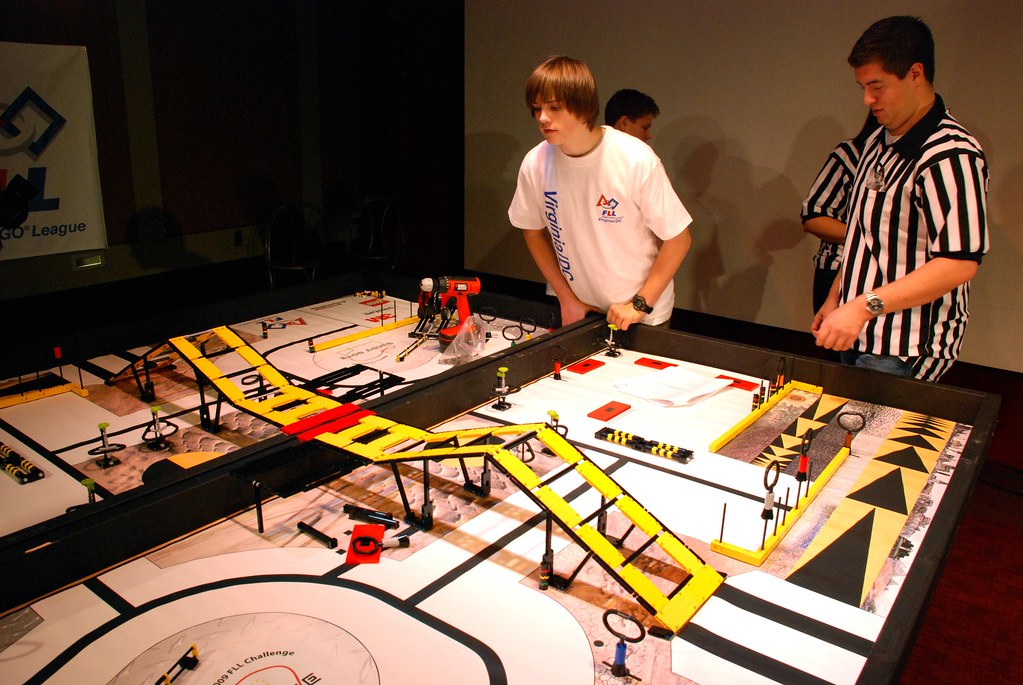
This past weekend we took our high school clubs to our regional TCEA robotics competition.  I have been working with one of the clubs for the last few weeks trying to help them prepare for this competition.  After making connections with these students it was that much more fun to see them in their first competition.

What I saw were students engaged in problem solving, critical thinking, collaboration, and communication.  Only they didn't really know they were engaged in any of that.  Mostly because they were having so much fun with their robots!  Having fun when you learn makes such a difference!

My favorite pieces of the competition:

  1. In the arena competition they have to compete in multiple rounds.  In between those rounds they get about 30 minutes to adjust their bot (either through physical or program modifications).  They must work together to identify the needed adjustments, and the divide and conquer to enact those adjustments.  And they must do it quickly in order to test the outcome and make sure they haven't broken anything that was already working.
  2. In the invention competition, they are not only judged on the invention itself, but also on how they present and 'sell' their idea.  They have to create marketing materials, and give an oral presentation.  They also have to show their robot in action.  This is practice that our students desperately need if they are ever going to successfully sell and idea, or a project in the future.
These are skills that aren't measured on standardized tests.  They aren't reflected in accountability ratings.  Yet, they are (in my mind) absolutely critical to our student's success in their future endeavors.  I can't think of many better experiences for our students to have.  And on top of that they are getting a great STEM foundation.  I am very proud the successes we have had (two of our teams even qualified for the state TCEA competition!).  But more than that I am excited about the direction our program is headed. 

So my question to you is:  How are you supporting robotics?  :)

Tuesday, December 13, 2011

'Appy' Hour! #edtech

I recently got a great idea from Carl Hooker (@mrhooker) to have an 'Appy' Hour in my district.  Carl has been doing these in his district this semester, and his implementation was influenced by the ideas of Lisa Johnson (@computerexplore).

The idea is to get a group of iDevice users together and facilitate the sharing of their favorite Apps.  One of Carl's great ideas was to create an App menu.  I love this idea as it fits in so well with the happy hour theme, and then it gives the group some specific Apps to explore/discuss.  The App menu is created as a PDF with embedded links to the provided apps.  When you open this PDF in either your iPad browser or iBooks the links are clickable, and the users can easily navigate the App Store to research and install the apps.  This really makes it simple, AND FUN!

My first Appy Hour will be for our Principals.  The apps I pulled together for them focus mostly on note taking and audio recording/translation.  I added in a few creative Apps (like puppetpals) for when they might need a laugh at a staff meeting!  Here is the App menu I have created for them:


I used the open source Scribus software to create this App menu.  It was my first try at using Scribus, but I was impressed.  It took a little getting used to at first, but then it started to go pretty smoothly.  If you are looking for an open source desktop publishing package, I recommend it.

What Apps would you include on your App menu for Principals/Administrators?

Thursday, November 3, 2011

iOS Management Webinar #edtech

Carl Hooker (@mrhooker) and I did a presentation on iOS management at our Fall TECSIG meeting a couple of weeks ago. Tim Holt (@timholt2007) talked us into doing this same presentation as a webinar using Adobe Connect.

Tim was kind of enough to archive this webinar for us and you can find it here:

You need flash in order to view the archive, but as long as you use a flash enabled browser (like Photon) you can still view the archive on an iPad. :)

Carl does the first half of the webinar and talks about how his district managed their processes and decision making while embarking on their 1:1 initiative with iPads. In the second half of the webinar I talk about how we have managed our shared cart model with iPads. I also cover the details of the VPP program and how App licensing works.

You can also find some detailed notes that Sandy Kendell (@edtechsandyk) took during our TECSIG presentation here.

Storytelling - Dean Shareski

I had the pleasure of learning from Dean Shareski (@shareski) today at West Lake High School. He was discussing storytelling and how we have so many ways to tell a story these days. Below is the prezi he was working from:

Sunday, July 31, 2011

Special Interest Groups (SIGs) in your district? #edtech

Has anyone successfully created special interest groups (SIGs) for the teachers in their district? This is a project I want to try this year, but I am wondering if anyone else has tried it already. And if so, how did it turn out?

I would like to create different SIGs for specific technology topics. Like say an iPad SIG, or a collaboration SIG. The SIG could meet monthly, or every couple of months. Not so often that people get burned out, but enough that people can get regular information on the topics.

I want to run the meetings in an 'un-conference' style. Where we can run short concurrent breakout sessions which are driven by the requests of the crowd. I think we could start out with our technology specialists running the breakout sessions, but my hope would be to eventually have the teachers (and possibly students and community members) take over the presenting.

Is anyone already doing something like this? How would you feel about participating in district PD run this way?

Wednesday, July 27, 2011

Allotment gone for Texas Virtual School Network (TxVSN)

New legislation from the 82nd Texas Legislature, First Called Session, 2011 introduced changes to funding for students taking online courses through the Texas Virtual School Network (TxVSN). A student enrolled in a course offered through the TxVSN enables the district to earn funding under Texas Education Code Chapter 42 in the same manner as a student who is enrolled in a traditional classroom setting. Separate TxVSN allotment funding is no longer available to Receiver or Provider Districts.


TxVSN will continue to offer quality online high school and dual credit courses for Texas students; however districts and open enrollment charter schools will be responsible for the course cost beginning with fall 2011. Schools may use a variety of sources of funds, such as Foundation School Program (FSP) funds, the Instructional Materials Allotment (IMA), applicable state and federal program and grant funds, or local funds.


For additional information, visit www.txvsn.org.